Features
Everything it keeps, and how
Everything a livestock project generates paperwork about, and what the app does with each one. The short version: it holds the figures and does the arithmetic, and it leaves every word a judge grades to the exhibitor.
Entry
Built for cold hands and thirty spare seconds
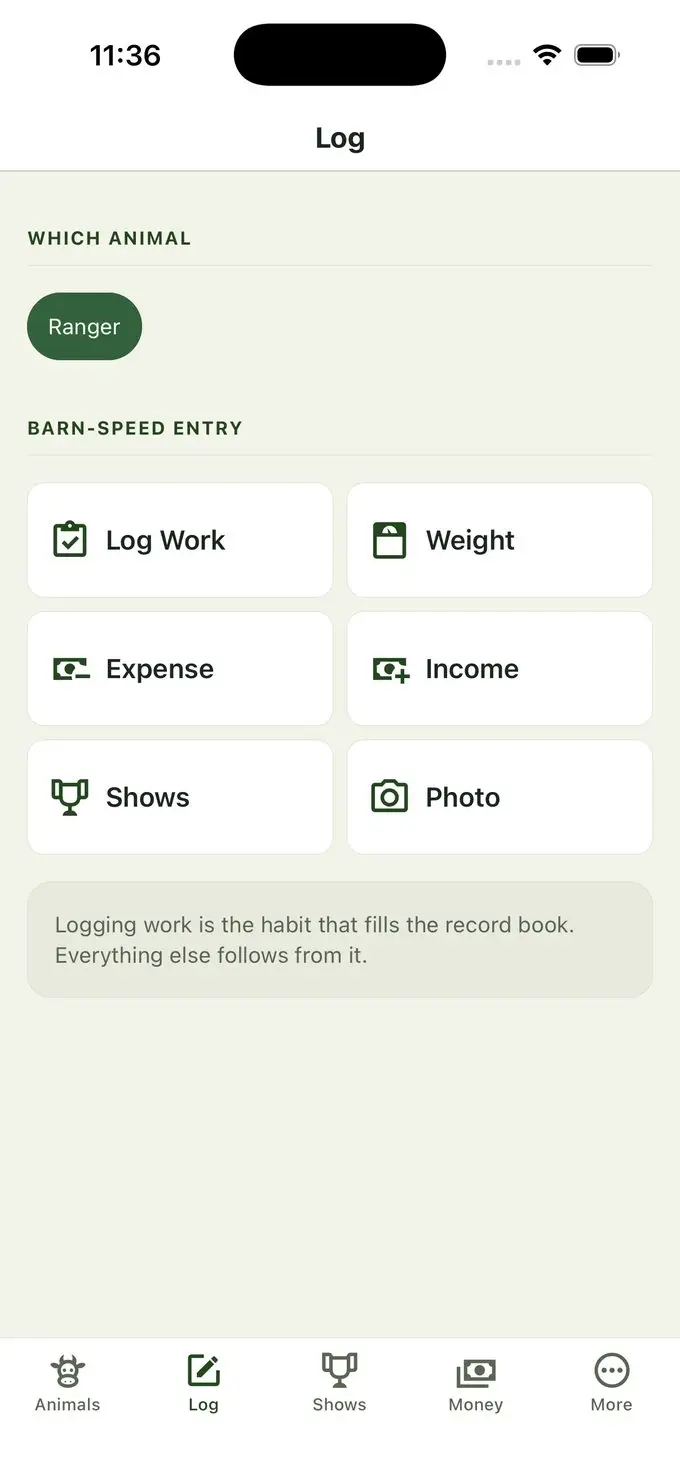
Everything starts from the Log tab: pick the animal, pick what you are recording, and you are two taps from done. Work, weight, expense, income, shows, and photos live behind the same six buttons, with Milk and Eggs beside them for an animal that keeps those records.
Logging work is the habit the whole record book is built on. Everything else — the gain figures, the cost of gain, and the hours in the book — follows from records that actually got entered on the day. A pass through the barn, or a receipt split between animals, is logged against several of them at once.
And every screen accepts a past date, so a stack of receipts from a shoebox goes in just as easily as this morning’s weigh-in.
Weights
Weigh-ins that take seconds and carry their context
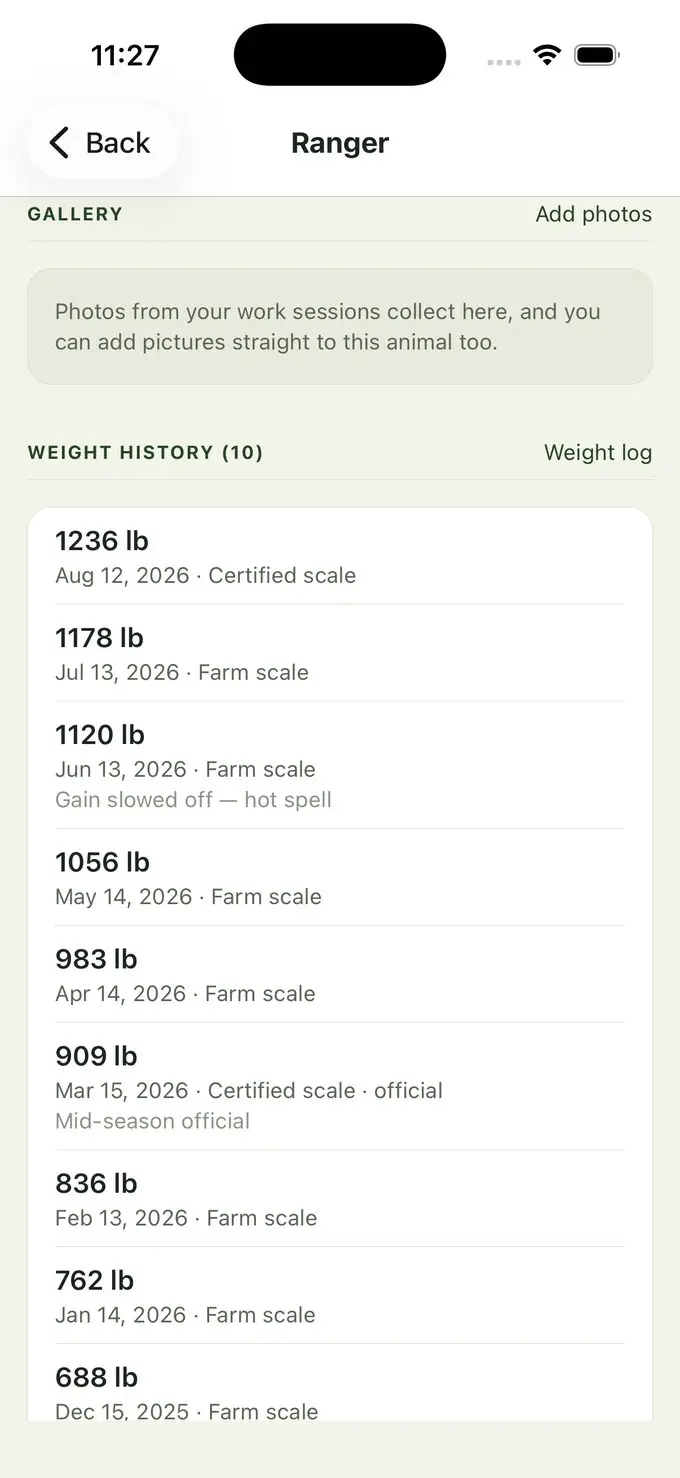
A weight goes in with a date and how it was taken — certified scale, farm scale, girth-tape estimate, or a fair or show weigh-in. That method is kept with the record so a tape estimate is never mistaken for a scale weight six months later.
Mark the weigh-ins your record book counts, like the initial weigh-in and the fair check-in, and a book that asks for them prints them as the official figures. The app never guesses the fair check-in. Where no initial weigh-in is marked, the book uses the first official weigh-in, or failing that the first weight recorded, and the printed page says so.
You set the weigh-in interval per animal — thirty days is the starting point, but it is yours to change — and the app reminds you when one is due. An animal that has been sold or closed out keeps its figures and stops asking to be weighed.
Gain
Two averages, because they answer two different questions
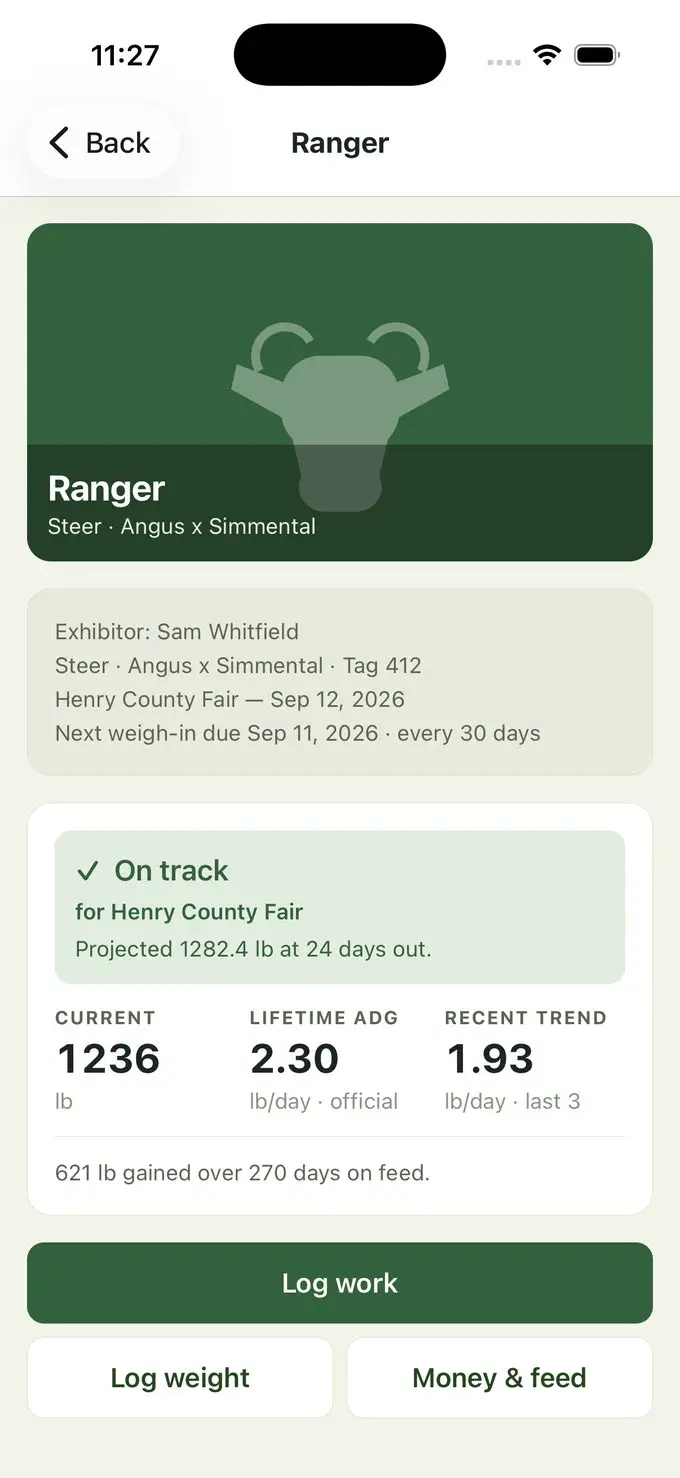
Lifetime average daily gain runs from the first weigh-in to the most recent. It is the official figure, and it is what belongs in the record book.
Recent trend looks only at the last two or three weigh-ins. It is noisier by nature, and that is the point — it moves first when something changes, which is what makes an early warning early.
Both are shown side by side rather than blended into one number, because a project that gained well for five months and stalled last month is not the same animal as one that has been steady throughout. With a show’s weight range or minimum daily gain recorded, the app projects to show day in plain numbers and names the show it is projecting to.
Feed
Feed cost, and what a pound of gain really costs
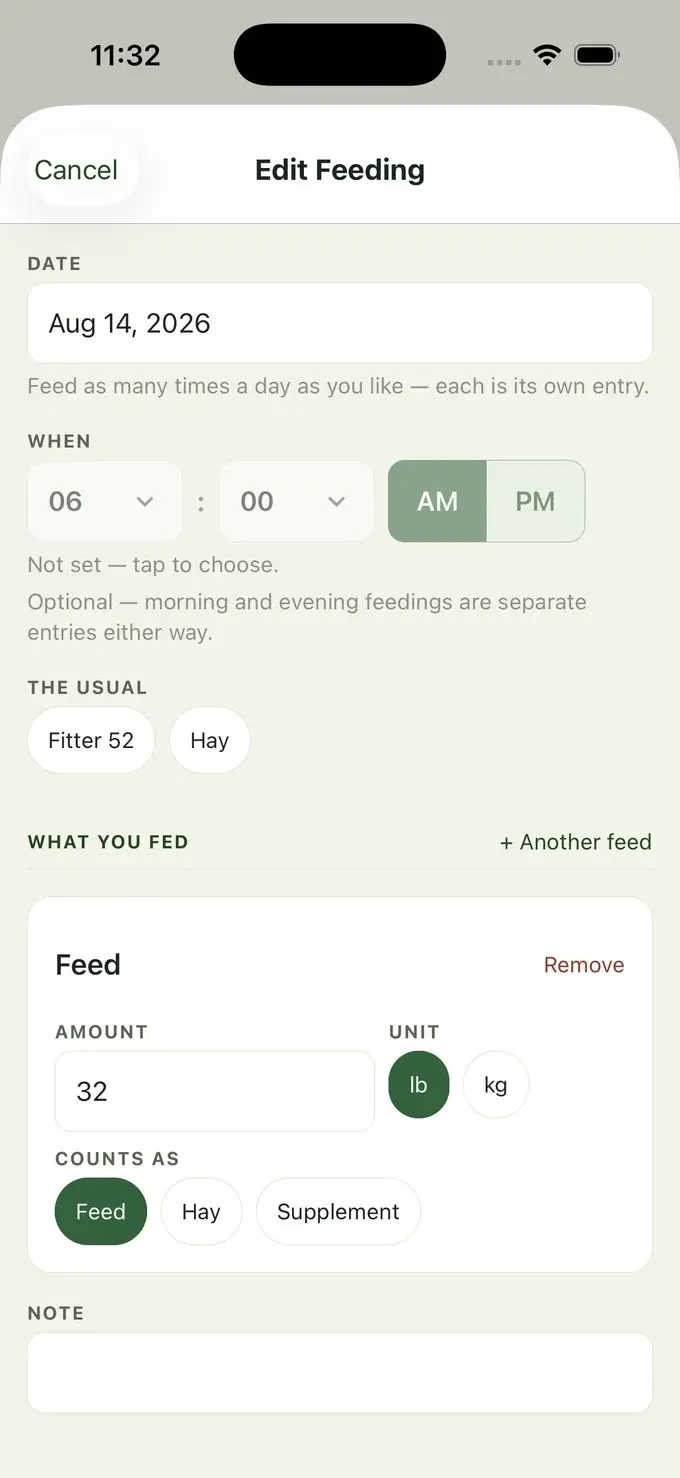
Record feed purchases and what was actually fed, and the app works out cost per pound of gain — the figure that separates a project from a pet.
Feed companies, lines, and product names come seeded so you are not typing them out, and each is marked as feed, hay, or a supplement. Protein, fat, and fiber are left blank on purpose: guaranteed analysis changes between formulations and regions, and a stale figure copied into a record book would be wrong with no way for a student to tell. You read it off the tag once, and it is saved against that product from then on.
Hay off your own field and a bag a neighbor dropped off go in as values in kind, with no receipt needed and never a suggestion from the app about what they were worth. Money is stored in whole cents from end to end, so a season of division and multiplication still foots at the bottom of the page.
Money
Expenses, income, depreciation, and break-even
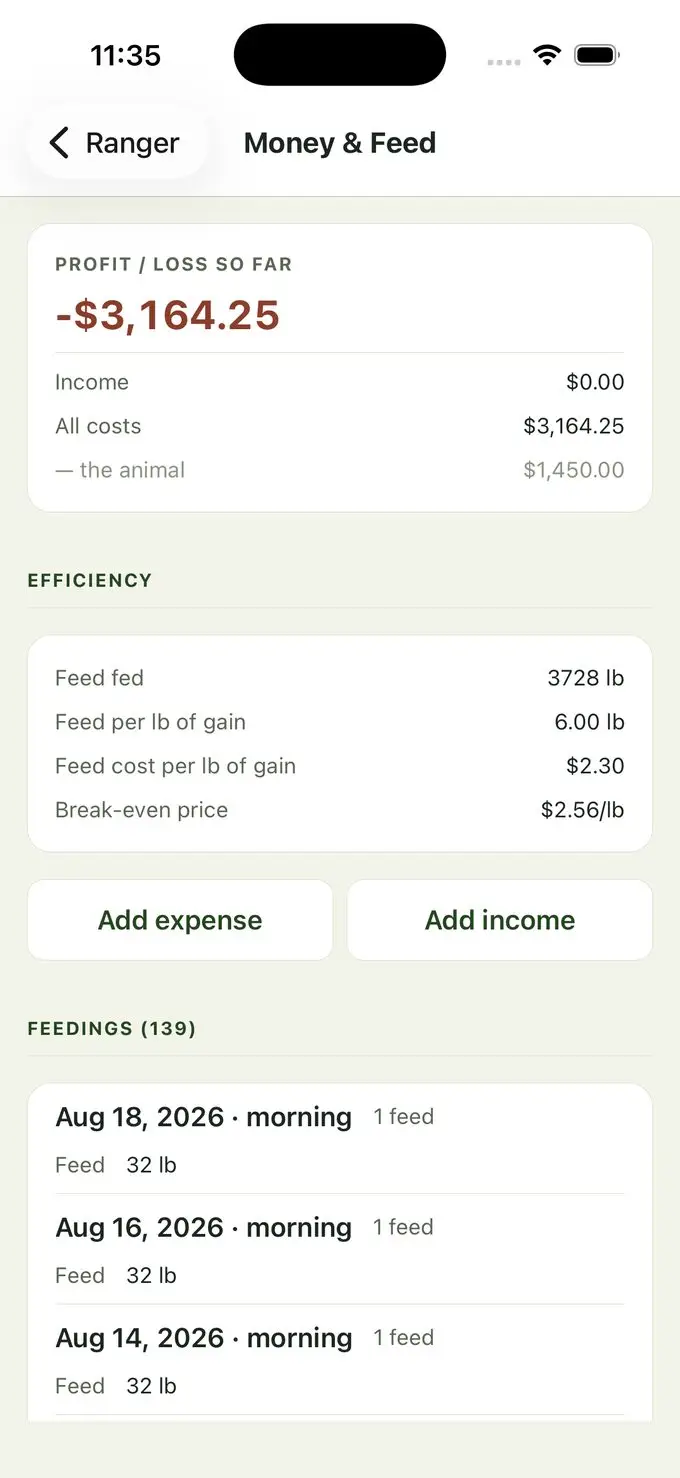
Categorized expenses and income, the purchase price, and the sale, with a receipt shared between animals split in shares that always add back to the receipt. Categories follow what real record books ask for rather than a generic accounting list.
Break-even tells an exhibitor what the animal has to bring per pound to cover what has gone into it — the number that turns a sale price into a result rather than a surprise.
Equipment belongs to the exhibitor rather than to one animal — clippers outlive a steer and serve the goats as well — so it is linked to every animal that uses it and depreciated for you. A gift in kind is recorded at the value you worked out and added to no money total, because no money moved.
Work
The daily work, logged before it is forgotten
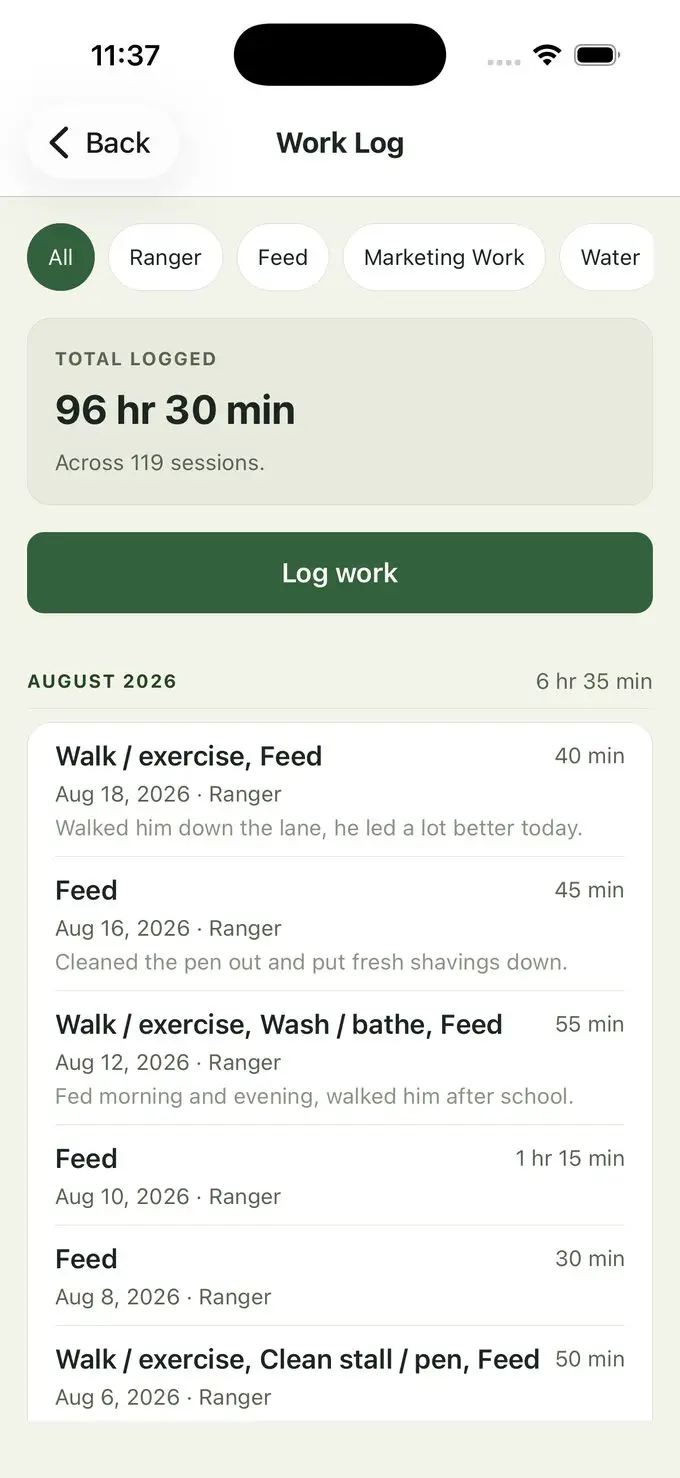
Log a session against several animals at once — feeding, watering, walking, washing, pen cleaning, grooming, milking, and marketing work — with hours and notes, and photos or video attached straight from the barn.
Photos collect into a gallery per animal, which is where a project story gets its detail from months later.
Averages are withheld until two weeks of records are behind them. Two hours logged on day one would extrapolate to “seven hours a week,” which is arithmetically true and a lie about the student’s actual work — and this figure ends up in a record book. When a figure is held back, the app says why rather than showing a dash.
Shows
Show dates, weight rules, and what happened
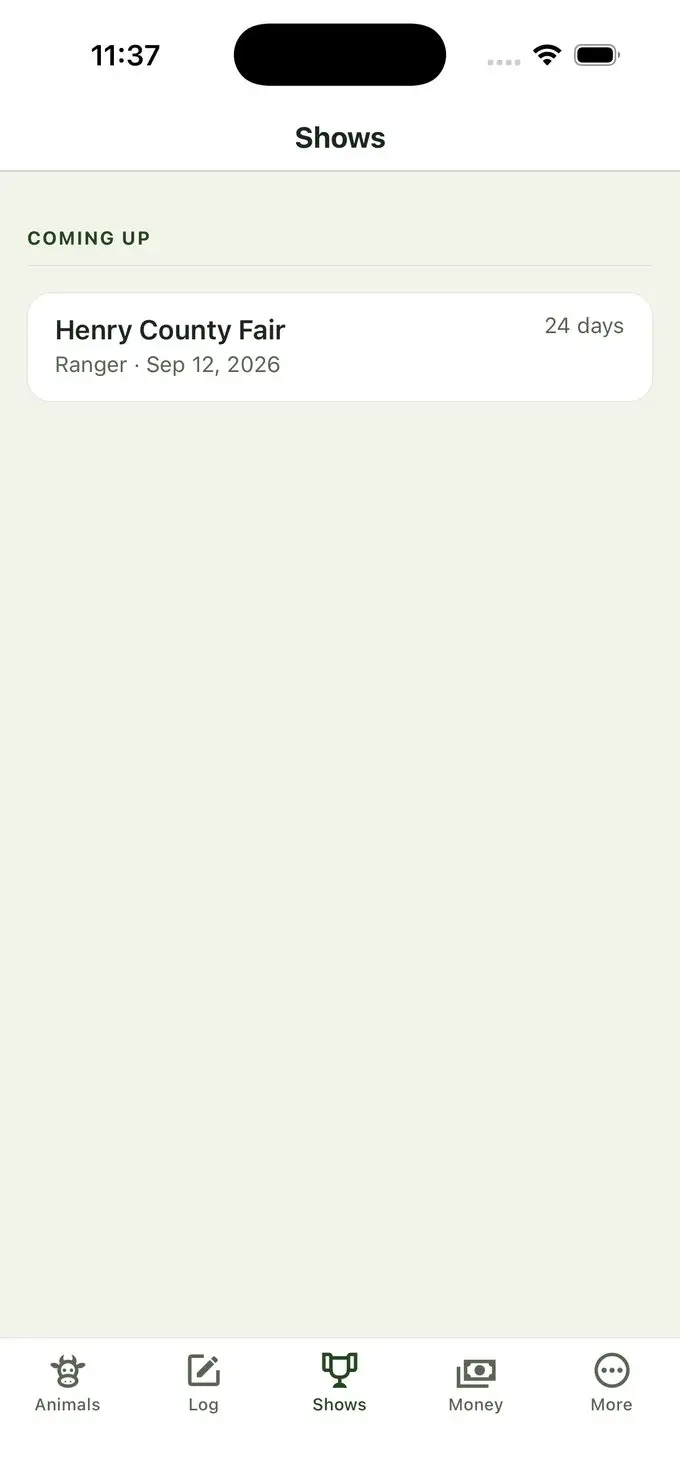
Pick a show from the published directory — Tennessee plus the major national jackpots — and its date, venue, and weight window for your animal come across with it. A county fair that is not listed is typed in yourself, which is most shows, and a show you typed in is yours to edit throughout.
A figure copied from the directory shows where it came from and when the list was last updated, and it reads as published, because one listing is shared by every family using it. The class, placing, entry fee, prize money, sale weight, and notes are yours. A listing that is wrong or missing goes to a short form, and you never have to wait on it to record your own show.
Nothing in the app assumes a season calendar. Show timing differs by state — much of Florida shows in March — so “what is next” comes from your own show dates. And once a show’s date has passed with no placing, sale weight, or sale price recorded, the animal’s page says so, while somebody still remembers the answer.
Buyer progress · this household
Contacts
Everyone around a project, with a buyer pipeline on top
Contacts hold everyone around a project — whoever buys the animal, whoever backs it, the feed store, the leader, and the vet — and one person can be several of those at once, because the feed store’s owner buys a lamb most years. They belong to the household, so last year’s buyer is this year’s warmest lead.
Buyers move through stages — might approach, invited, interested, and bought — kept per animal and sale, because selling an animal is a relationship built over months. A sale is a line per payer, since several buyers going in together on one animal is ordinary, and a gift toward the project never enters anyone into the buyer pipeline.
The buyer’s letter and the thank-you letter are tracked as two separate dates, because some record books grade them separately. The app records whether each was sent and flags a buyer who bought and has not been thanked. It writes neither — those are the graded work.
Breeding
Records for a project that does not end at a sale
Bred, due, birthed, rebred. Breeding records run year after year, which is what makes a record-keeping app worth opening in a month with no show in it.
An expected birth is reported as a window, not a date. Individual animals vary by roughly a week either side of the species average, and someone planning to be present for a birth needs the range — a single confident date would be worse than useless.
A due date you enter yourself always beats the species average, because someone with an ultrasound knows more than a table does. An unspecified species gets no invented figure at all, and a dairy heifer who calves is asked whether to start keeping her milk records.
Breeding · Willow
Production
Milk and eggs
Milk and egg records, a day at a time
A dairy cow, a dairy goat, or a laying flock gets a Milk or Eggs button of its own, worked out from the species, sex, and project type already recorded rather than asked. A figure is kept in the unit it was measured in, and a week grid, or a several-day total off a farm statement, takes care of the days that were not written down at the time.
A day counts toward the daily average only when every milking of it was recorded, and the monthly table says how many of its recorded days were complete. A lay rate waits for two weeks of records, and a blank day is never read as a zero. A cow that freshens again starts a new lactation, and the earlier ones stay to be read and corrected.
Nothing here judges the animal: no breed comparison, no projection, and no “healthy” band on a cell-count chart. The app never suggests a price for eggs either, and the estimated income column waits for your own figure per dozen.
Charts
Your records drawn as charts, and free to look at
Weight against the show’s weight window, gain between weigh-ins, feed, work, where the money went, milk, and eggs, each drawn from your own records. Points sit where their dates fall, so the two weeks nobody weighed in show up as a gap rather than disappearing.
A month with nothing recorded is left blank rather than drawn as a zero, and a chart with too little behind it says so in a sentence instead of quietly vanishing. The captions say how to read the picture, and never whether the animal is doing well.
The charts on screen are free. They are the same charts the detailed report prints, from the same figures, so the picture on the phone and the one on paper cannot disagree — and every one of them survives a black-and-white copier.
Charts · Ranger
Coming up
Reminders
Local reminders, no server involved
A reminder is whatever you say it is, in your own words, on the day you pick, with an animal or a contact attached if you like. Weigh-ins and goals remind you too, all at one time of day you choose. Your phone schedules them and your phone shows them; none of them travel through a server.
Permission is asked when you save your first reminder or an animal — the moment you have just said you want to be told about something — rather than being sprung at first launch.
A reminder that has gone off stays overdue until you tick it, because a notification going by is not the job getting done. If you decline notifications, everything still works: what is due and overdue is shown in the app as well.
Sharing
Answer “how’s the steer doing?” without handing over a book
One animal’s current figures render as plain text you can paste into a message. That question gets asked constantly, and handing over a whole record book to answer it is absurd.
A stale weight always carries its age, and so do the milk and egg lines for an animal that keeps them. The number is leaving the phone and landing in someone else’s hands, so it has to say when it was taken.
The summary carries only figures the app computed — no reflection, no goals, no note to a buyer. A share button is exactly where it would be tempting to hand over written work, and the app’s own tests assert that it does not.
Ranger · status to share
Notebook · this year
Lessons and goals
Somewhere to write it down when it happens
The questions at the back of a record book get answered in one sitting at the end of the year, when nobody remembers the morning the waterer froze. So there is a notebook for what went wrong, what you would do differently, and what the project taught you, a line at a time, as it happens.
Goals get the same: the goal, an optional plan, and a diary of progress notes stamped with the day they were written. Retiring a goal or bringing one back is recorded too, because a plan that visibly changed is worth more to the write-up than one that pretends nothing moved.
The app supplies headings and no words — no starter sentence, no suggestion, and no example. Notes and goals print in the detailed report as working material, and never in the county book, whose story pages print as the office’s questions over blank lines.
Health
Withdrawal times, worked out rather than remembered
Five of the eleven record books in this version have a health page, and Henry County’s explains the stakes: a student signs a certificate at the fair stating they observed every withdrawal time.
Record a treatment with its route, its site, and the withdrawal times on its label — meat in days, milk in hours, and eggs in days — and the app states plainly when each one clears, so it is not being worked out from memory the night before check-in. It states dates, and never whether an animal may show; that is between you, your leader, and the rules of that show.
Health is never behind the paywall. Withdrawal periods are food safety, and putting that behind a subscription is a bad look no revenue justifies.
Withdrawal
Backup
Backup
A lost phone is not a lost season
Backup writes one file holding every figure and word you entered — animals, weights, feed, money, work, health, and the rest — and restore puts it onto another phone. Save one every so often and email it to yourself or a parent.
Photographs are not in that file. On an iPhone with iCloud Backup switched on, iCloud carries them, because they sit in the same place as the records. A photo or video taken with the app’s camera is also added to your Photos library unless you switch that off in Settings, and a picture that matters can be shared out of the gallery and kept with the family’s other photos. And keep the paper — a shoebox of receipts rebuilds a money page when nothing else can.
Backup and restore is never gated, on any version or status. It is the escape hatch, and it is what makes charging for the reports fair rather than a way of holding a season to ransom.
Getting it out
Three reports, for three different jobs
The county record book — your program’s book laid out page by page after the office’s own edition, from records you have already entered. This version has eleven books from five programs.
The detailed report — charts, photographs, and a full financial summary of the whole year, made to be printed and cut into a paper book, with a text version for a message. The charts carry color, but every distinction also survives a black-and-white school copier the night before.
Spreadsheet files — the report’s tables as CSV files you can open in Excel or Numbers, one table per file. All three are Pro. Choosing your county’s book and seeing what it still needs is free, and so is the backup.
Reports
This household
Whose book
A household, not a single child
A book is kept as a youth or an adult record. That choice changes which fields the form asks for and nothing else — the records themselves are identical. A youth book keeps school, grade, and club; an adult book keeps farm name, phone, email, and website instead.
An adult running a ranch is never asked for a school grade.
Several books live side by side — siblings, and often an adult alongside a child. The app asks whose to open once per launch when there is more than one, and never asks when there is one. The free version keeps two books with one active animal each, and an adult’s book counts exactly as a child’s does.
And a short list of what it deliberately does not do
Every one of these would be easy to add. Each is left out on purpose.
- Write project stories, reflections, or goals
- Write buyer letters or thank-you letters
- Give veterinary, nutrition, dosing, legal, or tax advice
- Tell you what to change about a feeding program
- Guess a feed’s protein, fat, or fiber from memory
- Invent a gestation figure for an unspecified species
- Print an average with too few days behind it to mean anything
- Suggest what a gift, homegrown feed, or a dozen eggs was worth
- Say whether an animal may show after a treatment
- Look up the weather, which would have transmitted an animal’s location
Get the season into one place.
Free for up to two exhibitors, with one active animal each. Pro is a yearly subscription, and the App Store shows the price for your country.